Well happy (very) belated New Year to you all! What seems like it must have been a nice, peaceful break was actually quite busy! After years of happily consuming the great Web Almanac every year, the 2025 edition was the first time I finally returned the favor and made a contribution, writing two sections of, and helping review, the Performance chapter, and helping update and run several queries for the CSS chapter! It was an honor to work alongside so many talented geeks and nerds, and a pleasure to give back even a tiny bit! Looking very forward to next year already! :-)
Certainly one of the big CSS items already this year has been the formal announcement of the grid-lanes layout (formerly referred to as masonry). And while most demos show-off photo galleries similar to the Pinterest layout, if you scroll down to the “Spanning items” section (sorry, no deep link available), you will see one of the more interesting use-cases to me, sort of a newspaper layout, for content rather than photos… I hadn’t realy thought of that, but it is a great idea!
In a recent CSS Weekly video (YouTube), Zoran Jambor explains another great new CSS feature, overscroll-behavior: contain, including the upcoming improvement in Chrome 144, as well as the wonderfully-related scrollbar-gutter: stable feature. These are both terrific, and should probably be added to any reset or base CSS that you use.
Sticking with scrolly things, Una Kravets shows off several scroll-state() query options. These are great progressive enhancements, and great options for replacing current JS options (or at least feature-detecting and polyfilling if necessary)!
Manuel Matuzović shares a clever method (that was shared with him!) for reducing CSS selector specificity for multiple rules at one time by wrapping them in an anonymous @layer! Clever indeed!
Chrome 144 comes with a new HTML element. You don’t hear that everyday! But yes, <geolocation> is a new HTML element that provides a native method for requesting the user’s current location, which feeds that info into your functionality. The benefit of this approach is a) consistency, removing all the innumerable variations of bespoke implementations; b) a better user experience, because the user can initiate the request themselves, rather than some page seemingly-randomly shoving some request for permission in their face, often before they’ve even had a chance to look at the page; and c) an improved interactivity rate, because users won’t reflexively swat-away your bespoke request without even realizing what it was! This becomes intent-driven, which is great for the user! Of course, this currently being available in Chrome 144 only makes it a bit risky to just plop onto production, but, of course, you can always feature-detect and use this polyfill… :-)
And while we’re chatting about new Chrome stuff, Bramus Van Damme points out that v145 will include an update so that Using 100vw is now scrollbar-aware (under the right conditions). Take heed, as this could cause issues for some existing implementations, though they apparently did quite a bit of testing, and found the number of sites that might possibly be affected was quite low, so, fingers crossed!
And related, I share Alan W. Smith‘s utter shock at finding out that if Google Bot “can not reach [a site’s robots.txt], it will stop and won’t crawl the rest of your site”… What??? Apparently true, that quote is taken from the Google Suport article Fix ‘robots.txt unreachable’ Error ~ Website Not Indexing?. So, yeah, you, ah, might wanna go check on your robots!
Always a fun topic, Jasper Lai shares a wonderful collection of macOS Tidbits (CAUTION: It is a long… list…). No doubt you will know some, but it’s unlikely that you’ll know them all! Absolutely love “When taking screenshots, hold ⌃ to copy the image instead saving it to your desktop” and “With any standard column view (such as in Finder), hold ⌥ to resize all columns equally“, but can’t seem to get “…double-click and drag to select word-by-word. Triple-click and drag to select paragraph-by-paragraph” to work for me; anyone?
As long as we’re doing listy things, Adam Argyle offers us 4 CSS Features Every Front-End Developer Should Know In 2026. As usual, Adam does not disappoint…
And in case you missed the last entry to the 2025 Web Performance Calendar, here’s one more listy thing, as Keerthana Krishnan shares her list of Chrome DevTools Features I Use All the Time (and Why You Should Too).
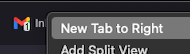
I am sure this is not new, but it is certainly new to me: In both Firefox and Chrome, if you right-click a browser tab, you can add a new tab to the right of the one you right-clicked:
align-content, align-self, align-items, justify-content, justify-self, justify-items, place-content, place-self, place-items… Anyone else nauseous yet? Anyone else often just cycle through these until the thing does what you want?? Well Temani Afif is here to help shed some light on The Fundamentals of CSS Alignment. And pay attention while you’re reading, because there’s a quiz at the end!
Some of you may remember that Safari 17.4 introduced a new switch attribute for the <input> element. It works simply enough:
<input type="checkbox" switch>
Live example:
Of course, switch is still only supported in Safari, but now Thomas Steiner has kindly created and shared A polyfill for the HTML switch element. Thanks, Thomas!
The prolific Theodore (Soti) L. sheds light (er, shadow?) and finesse on something I easily admit I had certainly never given much thought to: Box Shadows. His article Designing Better CSS Box Shadows Easily creates a recipe for building relatively simple, but noticeably-improved, box shadows… Bravo!
Don’t call it a reset, as Jens Oliver Meiert shares his Minimal CSS Starter. It is definitely minimal, with only 3 rulesets, but they are good bits to add to any site, I’d say!
And finally, with the absolutely mind-bending amount of absolute fuckery that is running rampant in the US right now, in addition to the truly heart-warming public outcry and open rebellion that springs up every time the Neo-Gestapo shows up in some poor unsuspecting and undeserving city or neighborhood, it is also truly heart-warming to see things like How Hackers Are Fighting Back Against ICE… I promise, world, the very large majority of us do not want any of this to be happening, and are trying our damnedest to end it… I know the US will never be looked upon the same, deservedly, but please remember there are some good people trying to fight back here, too…
Happy reading,
Atg