I blab a lot about performance metrics on this blog. Stuff like TTFB, LCP, CLS, INP, etc. Basically, “How fast or stable is your site?” But there are all kinds of other metrics one can look at to measure the user experience, like UX metrics!
- Roma Videnov explains how measuring UX can help you achieve an objective evaluation.
- Alex Szczurek shares a list of UX metrics to help you measure!
- And once you have your process and your metrics in place, Matthew Garvin helps us create UX scorecards in order to quantify and communicate the user experience.
Now, back to blabbing about performance stuff… :-) Not sure how I missed Andy Davies‘ Layout Shift Visualizer. So simply sweet… Create a trace in Chrome DevTools, drag-and-drop onto the page…
Una Kravets runs through several real-world examples for using CSS @media range syntax. Briefly, instead of using something like this:
@media (min-width: 100px) and (max-width: 1900px)
We can now do something like this:
@media (100px <= width <= 1900px)
Una has a lot more useful examples... ;-) Also note that range queries are now Widely Available!
Sticking with Una, and adding in some Bramus Van Damme, in a recent CSS Podcast, they discuss the finer points of the Invokers Command API. I was surprised at how hard they pushed for implementing this now, even though this is still currently Limited Availability (Safari), even recommending using a pollyfill. Perhaps this is going to be super powerful soon, but for now, at least for popovers (the main out-of-the-box use for command and commandfor), popover and popovertarget already work really well, and are already Widely Available...
And while CSS Subgrid is currently still Newly Available, Josh Comeau walks us through several great layouts that make use of the fairly-new tech!
With all this chat about Baseline, it seems a logical time to mention that Rachel Andrews has published the latest Baseline Update article, highlighting what has "come of age" in the past month. Jeremy Wagner also writes about the updates, with a few more details on some of the "bits".
Another cool new CSS feature on the horizon is object-view-box (which could use your love, if you also think it'd be cool to have)...
DebugBear recently added a new TTFB Test to their list of free tools! Amazing!! And it is incredible (to me) how fast the TTFB Test fetches a site from 10 locations around the world! Note that you initially see results from one of the locations highlighted at the top of the page, with each sub-part displayed as a percent:
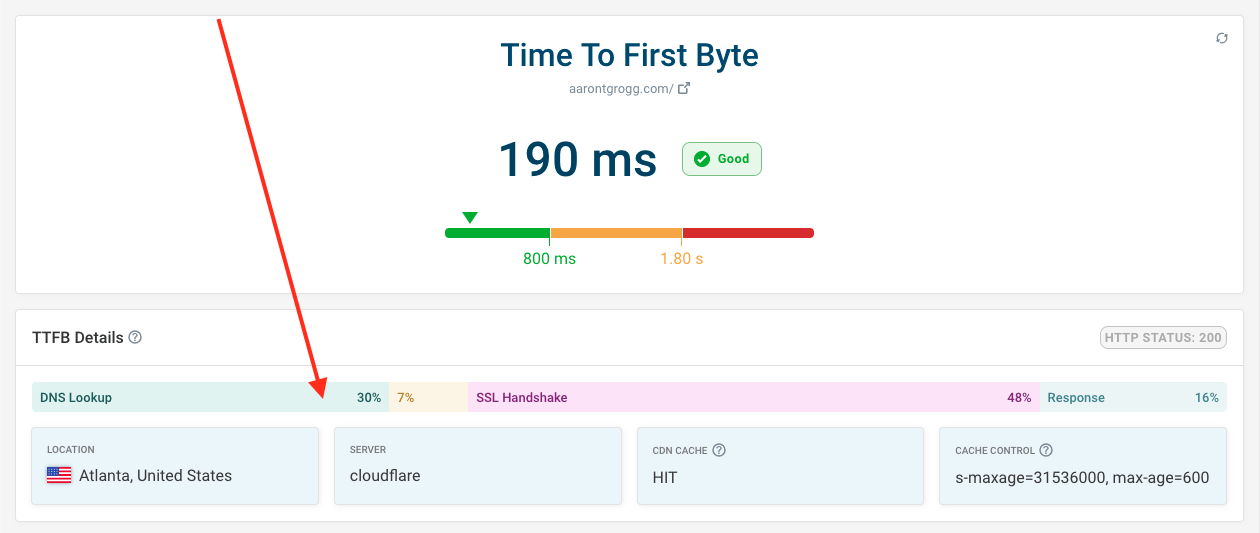
You can also click that sub-parts graph to see the individual times for each sub-part. Below that is a map highlighting each of the locations, and below that is each result from each location. Finally, clicking each of the locations changes the data presented in the graph at the top. Super handy!
Amit Sheen walks us through using CSS custom properties within animation keyframes to create consistent animations throughout your sites. Smart stuff!
Speaking of CSS Custom Properties / Variables, Adam Argyle runs through 10 powerful ways to use CSS variables, including tokens, props, mixins and more! :-)
Another cool use for CSS Custom Properties, Christian Heilmann uses them to shuffle a CSS grid. Super useful if you have any form of "gallery" where you want to shuffle "who gets seen".
David Bushell has just laid down a life lesson on how to deal with progress: He realized his famed Pikaday polyfill has become less useful, since one can now simply use <input type="date">, so he rebranded his polyfill to become a tutorial on the native date picker...
In David's own words:
We’ve decided to archive the Pikaday repository on GitHub. The project has not been actively maintained for years.
Pikaday was started before<input type="date">was supported in browsers and before custom elements and component frameworks. Pikaday is probably not the right choice today.
Thank you to everyone who reported issues and contributed code :)
- https://github.com/Pikaday/Pikaday
Just brilliant, David, thanks for the lesson.
New to me is the Web Lunch series on CodeTV (also new to me!). Seems I have some watching to catch up on...
And finally, Jim Nielsen shares a few notes related to "Productivity"... Painfully familiar vibes...
Happy reading,
Atg