Early Hints, Resource Hints (comprised of dns-prefetch, preconnect, preload and prefetch links), and Speculation Rules all perform similar tasks: they try to fetch things sooner than necessary, so the user doesn’t have to wait for them when they are actually needed.
But how and when they go about that fetching varies quite a bit, which means that, as similar as they are, they are also quite different, and therefore should be used in different circumstances.
This article aims to help you get to know each approach a little better and understand which one is right for which situation to get your users the best possible experience.
Table of Contents
BLUF
- Early Hints: The most lead time you can give the browser for important assets or connections that the incoming page will need. Great for preconnecting to external domains or preloading assets like LCP images, main CSS or JS files, custom font files, etc. that the incoming page will need soon. Browser support has increased recently, but server support is limited and can be a bit tricky to setup and coordinate.
- Resource Hints: Appear in the page currently loading in the browser, but can still give a head-start on important assets or connections that the current page will need. Great for preconnecting to external domains or preloading assets like LCP images, main CSS or JS files, custom font files, etc. that the incoming page will need soon, or for prefetching assets that the next page will need. Fairly easy to setup and use, though coordination can easily get out-of-sync.
- Speculation Rules: Do not help the current page at all, but can make transitions to the next page almost instantaneous. Great for preloading pages that the user will likely visit next. Fairly easy to setup and use, though choosing which URLs to include is at best guess-work, so can result in wasted resources.
Details for each of these methods are presented below.
Early Hints
When a browser requests a page from a server, the server sends a response to the browser, but not in a single transaction.
The server responds with the page that the user requested (the actual HTML document), but also with other responses. In fact, usually several other responses.
One of the responses that might happen, possibly while the HTML document is being prepared by the server, is known as Early Hints; you might also see them referred to as 103 Early Hints, because 103 is the response header code.
Within Early Hints, we can include references to either assets (important image, font, CSS or JS files) or domains (ideally only for render-blocking assets that are hosted on other domains) that the incoming page will need.
If this information is sent to the browser before the actual page is, the browser can actually start fetching these assets or preconnecting to these domains before the page has even arrived, so that by the time the page does arrive and starts to render, these assets and/or connections are either already ready for use, or should at least arrive shortly; certainly faster than if they had to wait for the page to arrive and start rendering before they could even be requested!
If your site uses a CDN, and the domain for that CDN is different than your site (most likely), you might include a preconnect Early Hint so the browser can negotiate that connection in advance of actually needing assets from that domain, so those assets can download more quickly; that might look look something like this:
Link: <https://cdn.example.com>; rel=preconnect
And if that CDN will be returning CORS-protected resources, you can add a crossorigin attribute:
Link: <https://cdn.example.com>; rel=preconnect; crossorigin
You can also preload an asset, like maybe the main stylesheet:
Link: </style.css>; rel=preload; as=style
Or something like the LCP image, where you might also want to suggest an increased fetchpriority:
Link: </path/to/image/hero.avif>; rel=preload; as=image; type=image/avif; fetchpriority=high
Now you know what Early Hints can do, I have some bad news for you: implementing them is not exactly straight-forward or simple…
They do not work as simply as you might expect. For example, they are not currently natively supported in PHP (because PHP natively builds the entire page before sending it to the browser), so you would need to use something like FrankenPHP or implement the Early Hints via your CDN.
Once implemented, however, testing whether or not your Early Hints are working is fairly straight-forward; here is an example in Chrome’s DevTools:
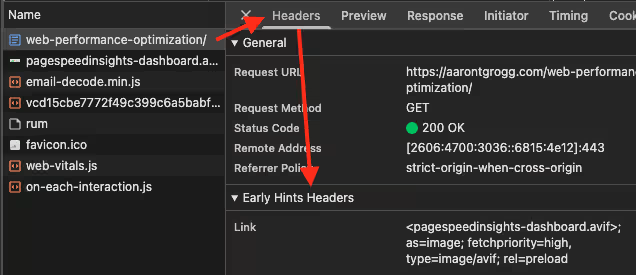
Make sure DevTools is open when the page loads, then select the Network tab, click the current page, and examine the Headers tab; note the Early Hints section, and any Early Hints received for the current page.
Firefox’s DevTools is very similar:
Resource Hints
Unlike Early Hints, which the browser can start working on before the page is even returned from the server, Resource Hints are included within the page’s HTML, ideally close to the top of the <head> (but after at least the meta "charset" and "viewport" elements).
There are four types of Resource Hint:
dns-prefetch resolves a DNS connection for an origin. It is not very resource intensive, so if you must create several additional domain connections, this can be an efficient way to get a partial headstart on each of them. But note, this performs the DNS resolution only, not any TCP or TLS portion of the connection. An example might look something like:
<link rel="dns-prefetch" href="https://fonts.googleapis.com/" />
preconnect goes one step further by also performing any TCP or TLS portions of the connection, but as these do require additional resources, it is recommended you use these more cautiously. As these are more complete preconnections, they are recommended for critical resources only, such as any render-blocking assets that are hosted on a different domain. An example might look something like:
<link rel="preconnect" href="https://fonts.googleapis.com/" />
preload is used to fetch an asset in advance of the browser actually needing it. This can be extremely beneficial for assets such as custom font files, LCP assets, or any other file whose faster download could benefit the page render experience. However, as you might imagine, these are even more resource intensive, because you are downloading entire files, so should be used even more cautiously. An example might look something like:
<link rel="preload" href="/style.css" as="style" />
Finally, prefetch is for resources that are perhaps not needed immediately, but will likely be needed soon. Perhaps something like a CSS or JS file for a component that is not initially rendered, but will be shortly. This might even be beneficial for assets required for future page loads, such as for user journeys that are well defined, such as a registration or checkout processes, or specific marketing flows. An example might look something like:
<link rel="prefetch" href="/component.js" />
While Resource Hints do require the browser to start rendering the page for the Hints to be discovered, they can still greatly benefit the user experience!
For example, by including something like the following near the top of the <head>, I have seen a preload link for a hero image improve a page’s LCP by 2-3 seconds (YMMV):
<link rel="preload" href="/path/to/hero/image.avif" as="image" type="image/avif" fetchpriority="high" />
The use of a preload link for a hero image is especially helpful if the browser’s rendering engine must process a lot of code before getting to the actual hero image element. Often, by the time the browser is ready to render its first paint, the hero image will be included with it. This is a great experience for the user!
DevTools does not explicitly tell you if assets are loaded via a Resource Hint or not. You can infer it, based on how soon the asset appears in the Network waterfall, or the Priority, but nothing says 100% “yay or nay”.
UPDATE: From Mr. Barry I see everything! Pollard comes an update on DevTools Resource Hint visibility: Add the
So, this doesn’t say anything as clear as “Preload” or something, but it is at least verifiable! Thanks, Mr. Pollard!initiator column in the Network panel. Reload the page and it’ll say something like index.html:56 to show this resource was requested by line 56 of the HTML. Click on it and it’ll take you straight there in the sources panel. And that’ll be where the preload is!
You can also test whether or not your Resource Hints are setup correctly using something like the free online validator offered by DebugBear. As difficult as 1) pasting a URL, 2) clicking a button, and 3) waiting a couple seconds for the page to return your results:
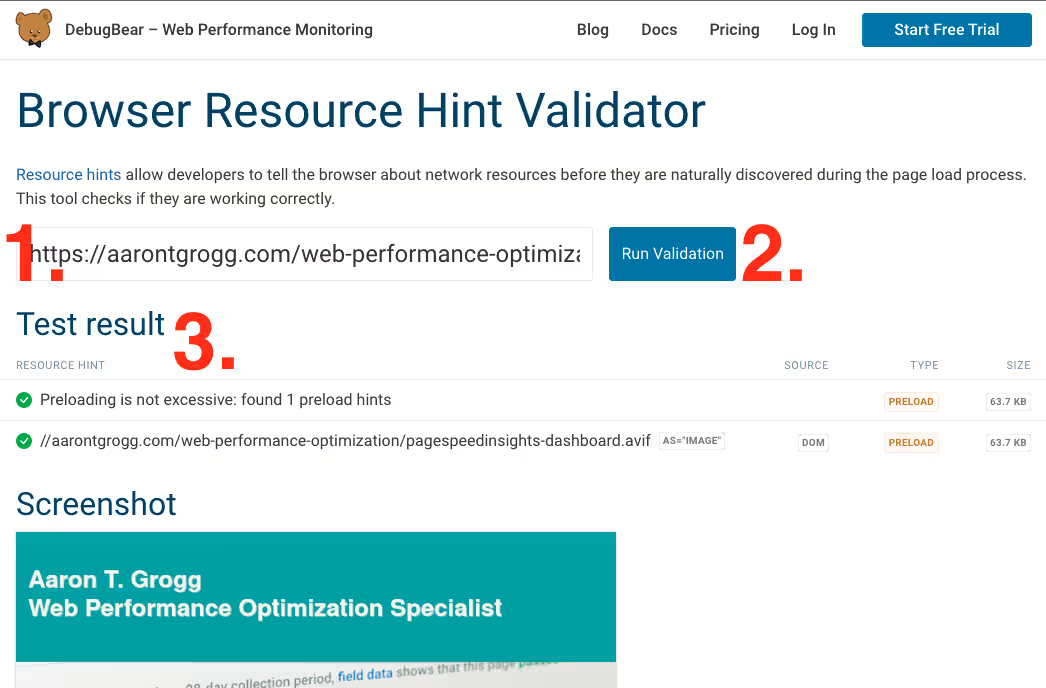
The screenshot above states that the tool “found 1 preload hints”, which it did not find to be excessive, and if you expand the second line item, it confirms that the “URL is valid”, the hint used the proper as attribute, and that the page did load an asset that matched that hint… That’s about as close as you are going to get. After that, just assume the browser did it’s job correctly… ;-)
Speculation Rules
Unlike Early Hints and Resource Hints, Speculation Rules do not help the performance of the incoming/current page. At all. Instead, they try to help the user’s next page load. And when implemented properly, they can make that next page load almost instantaneously.
But implementing them properly is actually the hardest part of Speculation Rules. Not the actual code, that is just a JSON block in the current page. But what goes inside that JSON block, that is the tricky part…
This requires that you know your users well enough to predict their intent, with relative certainty. Anything that you ask the browser to prefetch, and goes unused, is waste. Your user downloaded something they didn’t need to download, and your system prepped and sent something it didn’t need to.
So what goes inside a Speculation Rules block? The JSON block contains a set of rules that contain a collection of URLs, or URL patterns using Regex or CSS selectors, that you predict your users will visit after this current page. An example might look something like this, from the Speculation Rules API page on MDN (the explanatory comments are mine):
<script type="speculationrules">
  {
    "prerender": [ // downloads and renders these URLs in the background
      {
        "where": { // conditionals
          "and": [ // conditionals
            { "href_matches": "/*" }, // all relative URLs
            { "not": { "href_matches": "/logout" } }, // but NOT the logout page,
            { "not": { "href_matches": "/*\\?*(^|&)add-to-cart=*" } }, // or the cart,
            { "not": { "selector_matches": ".no-prerender" } }, // or anything else you want,
            { "not": { "selector_matches": "[rel~=nofollow]" } } // to specifically avoid prerendering.
          ]
        }
      }
    ],
    "prefetch": [ // downloads the page, but NOT any subresources, so these pages are NOT prerendered
      {
        "urls": ["next.html", "next2.html"], // pages you expect the user to visit next
        "requires": ["anonymous-client-ip-when-cross-origin"], // conditions
        "referrer_policy": "no-referrer" // conditions
      }
    ]
  }
</script>
For some pages, like marketing landing pages, the user journey should be pretty predictable (or at least your marketing team hopes it is). But for things like Home page, maybe not so much…
Again, your marketing team may hope that users will all jump into whatever is touted from the hero component, but they might also pick something from the main navigation menu. Or scroll down a bit and then click something. Or scroll all the way to the bottom and click the About Us page. Or they might just completely bounce.
So, what should go into that JSON block? I try to always be a data-driven kind of guy, so my recommendation is always to start with your analytics: as much as possible, for each page, check what pages your users typically visit next. If you can make those page transitions happen faster, that’s a major win for your users! Beyond that, it is really a matter research, testing, and refinement.
Some of that research should include “What have others already tried and found?” Why reinvent the wheel? Or fall into pits others have already found??
One of the classic examples is a site called Scalemates, created and maintained by Tim Vereecke of Akamai. Scalemates is not related to Akamai; it is a pet-project for Tim, but it is an e-commerce site and Tim has done an insane amount of research, trial-and-error, tweaking, etc., and has done a hero’s job of documenting his journey.
Another good source of research would be Shopify, who added Speculation Rules to their framework, as did WordPress. The native WordPress implementation is rather “loose”, and is likely not as fine-tuned as a business website would want, but that is you to research and decide; the aforelinked article explains how to customize their native rules.
Of course, once you’ve implemented your Speculation Rules, you will want to make sure they are working as you intended. In order to test if your Speculation Rules are working, open DevTools and navigate to the Application tab, then, down the left-side menu, click Speculation Rules, and you will see something like the following:
Note at the top of the right panel that this page did not load with any benefit from Speculation Rules. If you click one of the headlines under the Hot kits header, you will see that message change to “Success”, meaning that product page did benefits from Speculation Rules.
And if you happen to have a Core Web Vitals extension monitoring your page loads, you should see something like this from your benefited page load…
Note the TTFB of 0.000 and LCP of 0.035… Bravo, Tim. Bravo.
Summary
While all of these options allow the browser to “get stuff before it actually needs it”, they are all quite different regarding when they are available and how they can help.
- Early Hints let the browser start connecting to other domains or fetching important assets often before the page that will need them arrives.
- Resource Hints are not visible to the browser until the current page begins rendering, but can still have a dramatic effect on the page load experience by connecting to other domains or fetching important assets for the current page.
- Speculation Rules cannot help the current page at all, but can make the next page load almost instantaneously.
And so, as similar, and different, as they are, it is really together that makes them all shine the brightest.
- An Early Hint for the incoming page’s LCP asset, font files, and any external domains that might affect the initial page render can help assets be available, or be quite close to it, by the time the page begins rendering in the browser. That LCP could render with the initial paint, and there might be no CLS at all related to those custom fonts.
- Resource Hints within the current page, once it starts to render, could prefetch assets that lazy-loaded components will need, greatly improving their render time, giving INP a massive boost.
- And Speculation Rules, if planned properly, could make next page transitions so fast that users just click right through your user journey, resulting in increased conversions.
None of these options are exactly easy to implement and keep accurate, but hopefully you and your team can create a process that requires minimal manual intervention going forward.
And remember, while not all of these options are supported everywhere, they are all supported somewhere, and should all be gaining support in the future. That means, if you implement them now, they could be considered as progressive enhancements, helping some users now, and just waiting for support to improve to automatically start helping more users, with no additional work from your team!
So, what do you think of these three options? Are there any you would like to implement, or at least investigate? Would love to hear your thoughts, and/or any stories about how it goes! :-)
Resources
- HTTPWG‘s An HTTP Status Code for Indicating Hints
- MDN‘s 103 Early Hints
- Simon' Frey‘s Early Hint || The 103 Status Code and How to Implement It
- DebugBear‘s How To Improve Page Speed With 103 Early Hints
- Web.dev‘s Assist the browser with resource hints
- MDN‘s
dns-prefetch - MDN‘s
preconnect - MDN‘s
preload - MDN‘s
prefetch - MDN‘s Speculation Rules
Happy pre-fetching,
Atg